What Is Blocksi? A Simple Guide to School Internet Filtering and Parental Controls

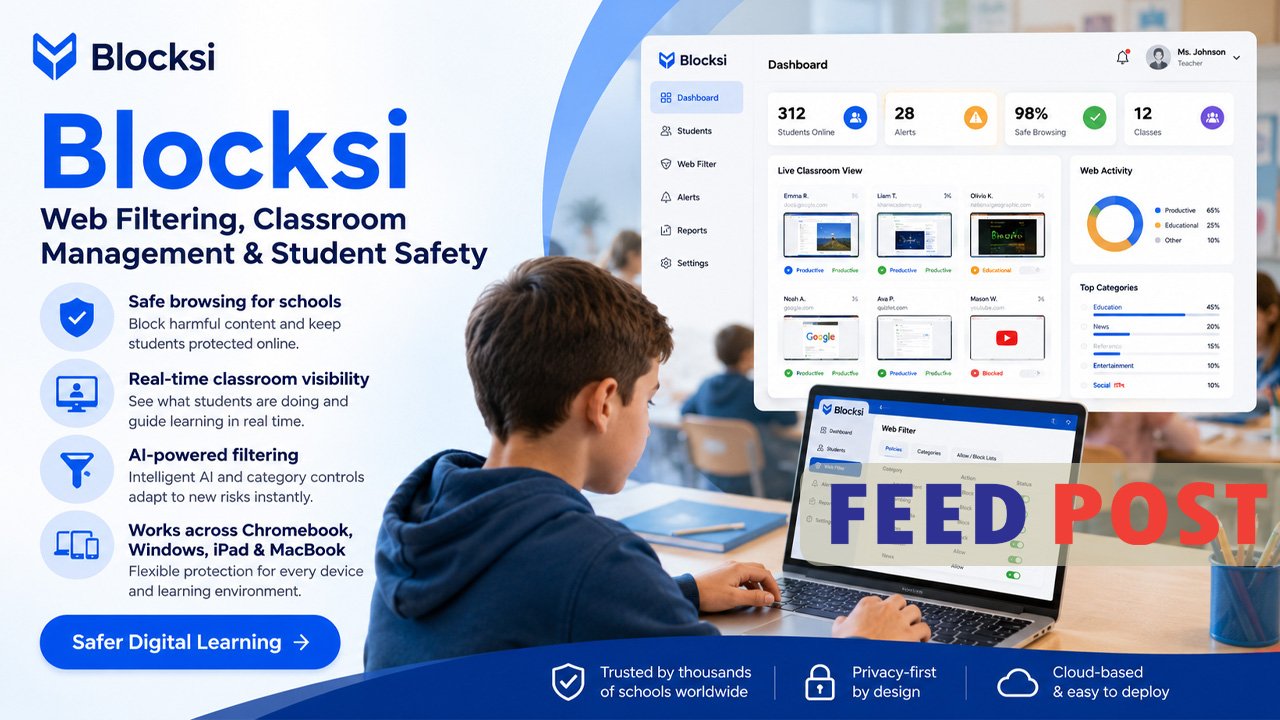
Blocksi is a cloud-based internet filtering and classroom management platform built for K-12 schools. It helps districts block harmful content, monitor student devices, and support teachers during class time. Blocksi, Inc. was founded in 2011 and is headquartered in Palo Alto, California, and it focuses on the Education K12 market with cloud content filtering and classroom screen monitoring for Google Workspace-managed Chromebooks and Windows devices. Today, schools, teachers, and parents use it to keep students safe both on campus and at home. This guide breaks down what Blocksi does, how it works, and whether it fits your school or family’s needs.
What Does Blocksi Do?
Blocksi offers three main services under one dashboard: content filtering, classroom management, and student safety monitoring. The company provides hyper-scalable cloud-based content filtering with a parent dashboard, a classroom screen management system, and around-the-clock online suicide prevention and threat detection with expert review. This combination lets IT teams, teachers, and parents each manage their own layer of protection from a single platform.
The tool is fully cloud-based, so it works whether a student is inside the school building or learning from home. This cloud setup ensures internet safety even outside of school hours, without relying on the school’s local network.
How Does Blocksi Work?
Blocksi installs as a browser extension or app on school-managed devices, most often Chromebooks. It is typically deployed through the Google Admin Console as a force-installed extension, which means students cannot remove it from the device or their account, so filtering stays active at all times. This setup gives IT administrators central control over policies across an entire device fleet.
Once installed, Blocksi filters web traffic in the cloud rather than relying only on local device settings. It provides web filtering across more than 85 categories, including adult content, security risks, and malware, along with YouTube filtering across more than 30 categories. It also enforces Safe Search across major search engines and analyzes page content to block sites based on detected keywords.
Key Features for Schools and Teachers
Blocksi’s Teacher Dashboard is one of its most-used tools in the classroom. Teachers get live thumbnails of student screens, along with the ability to lock browsers, push specific URLs, close distracting tabs, and build custom allow or block lists for individual class sessions. A mobile app extends these same controls to teachers on the go. The Blocksi Teacher app lets teachers view student screens and live browsing activity, open or close tabs, and run assessments with a browser lock during testing, along with attendance tracking and exportable activity logs.
Beyond classroom control, Blocksi includes safety alerts that flag warning signs in student activity. One school reported that Blocksi caught a student searching for information about suicide and alerted administration, allowing staff to reach out to the student’s parents. This kind of alert system is a major reason many districts choose the platform.
Blocksi for Parents
Parents can extend school-level protection to home devices through the Blocksi Parent app. This app lets parents enforce stricter filtering policies once a child’s device leaves school, control screen time for streaming, gaming, and social media, and receive alerts related to cyberbullying or self-harm risks. Parents can also review their child’s web and YouTube history and set bedtime or screen-time limits.
Some parents note limitations in the app’s flexibility. One reviewer pointed out that the time control feature only allows scheduling in one-hour blocks, which makes it hard to cut off access at an exact time like 2:15 p.m. without also affecting earlier class periods. This is a small but real usability gap worth knowing about before setup.
How Much Does Blocksi Cost?
Blocksi does not publish a fixed public price list. Instead, the company invites school districts to request a custom quote based on the number of users and the modules they select. This approach offers flexibility for budget-limited districts, but it can also make upfront cost comparisons harder.
Independent estimates suggest Blocksi is priced competitively against larger rivals. One industry comparison found per-student annual licensing starting around $4 per student for web filtering, with classroom management tools available at an additional cost, which is significantly lower than typical GoGuardian pricing for most district sizes. Some school IT administrators on Reddit’s r/k12sysadmin community have also described Blocksi as cheaper than GoGuardian, whose pricing they say keeps rising over time.
Blocksi vs. GoGuardian and Securly
Blocksi is most often compared to GoGuardian and Securly, the two biggest names in school web filtering. GoGuardian Teacher holds the highest G2 rating among this group, at 4.7 out of 5 stars from 101 reviews, and it remains the benchmark that districts most often compare Blocksi against, usually on price. Securly Classroom rates comparably to Blocksi on G2, with both earning 4.4 out of 5 stars, though Securly has a larger review base.
Each platform has its own strength. Reporting depth is a common gap for Blocksi, since its reporting score trails Securly Classroom, so districts that need deep analytics may want to evaluate other options. On the other hand, G2 reviewers felt Blocksi meets their business needs better than Securly Classroom and preferred its ongoing product support and feature roadmap.
Is Blocksi Reliable and Trusted?
Blocksi has built a strong track record with schools over more than a decade. More than 500 school districts and 3 million users currently rely on Blocksi to manage student devices for safe, engaged learning. Reviewers consistently mention its ease of setup and responsive customer support as standout strengths.
On the Chrome Web Store, the extension also carries a solid trust signal. The publisher has a good record with no history of violations, and the developer has disclosed that student data is not sold to third parties or used for purposes unrelated to the product’s core function. That said, some student reviewers on app stores have raised privacy concerns, arguing that monitoring feels intrusive in daily classroom life.
Final Thoughts
Blocksi combines web filtering, classroom management, and student safety alerts into one affordable, cloud-based platform. It works well for districts that want strong protection without the higher cost of bigger competitors, though schools focused on deep analytics may want to compare it against Securly or Lightspeed first. For most K-12 schools and families, Blocksi offers a practical, easy-to-manage way to keep students safe online.
Frequently Asked Questions
What is Blocksi used for?
Blocksi is used by schools and parents to filter harmful web content, manage classroom devices, and monitor students for safety risks online.
Is Blocksi free to use?
Blocksi offers a free Chrome extension for basic web filtering, but full school-wide filtering and classroom management require a paid subscription.
Can parents use Blocksi at home?
Yes, parents can use the Blocksi Parent app to extend school filtering rules to home devices and control screen time.
Is Blocksi safer than GoGuardian?
Both platforms filter content and monitor students, but GoGuardian rates higher for classroom tools while Blocksi is often praised for lower cost and simpler setup.
Does Blocksi work on all devices?
Blocksi mainly supports Chromebooks and Windows devices; it currently does not offer iOS support.
Unlock a world of new ideas and sharp commentary at Feed Posts.